

Favorite Shortcuts 1.8
Quick launch desktop menu providing one click access to favorite files, folders
Program info
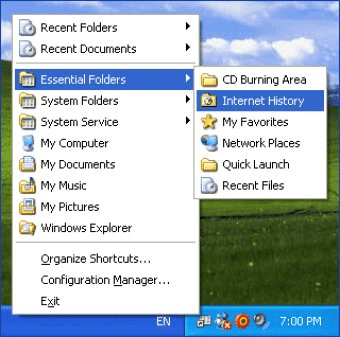
Favorite Shortcuts is a very easy-to-use quick launch tool that provides one-click access to the hierarchical list of favorite programs, documents and folders, Windows Quick Launch items as well as list of most recently used documents and folders.
It is available as a hotkey-driven popup menu, as an additional submenu in the Desktop context menu, in a folder background shortcut menu, in the Windows Explorer File menu, in the Internet Explorer Favorites menu and as an optional icon in the taskbar (system tray).
To bring it up, right-click on the Desktop (or any other folder background), point to Favorite Shortcuts, and then click an item in the popup menu. Also this quick launch menu available on right-clicking or left-clicking at the Favorite Shortcuts system tray icon or pressing the correspondent hotkeys.
To add new items to the favorite shortcuts list or to the quick launch, right-click a file or folder in Windows Explorer, and then select "Add To Favorite Shortcuts" or "Add To Quick Launch" in the popup menu.
Favorite Shortcuts provides fast and convenient access to the frequently used applications, files and folders, and allows to clean up your Desktop and keep it as bare as possible.
Details
Extensions

No information available
The data will be available later.Awards

There are no awards
Over time, app awards will appear here.


Comments